I recently shared a short post on LinkedIn:
“If an agent can do the job with an existing CLI, I do not think we need to build another MCP integration.”
Let me explain the thinking behind it.
Start with the Tools You Already Have
Before building an integration, I would ask what the agent actually needs to do.
Maybe it needs to list pull requests, inspect a deployment, or read a file from cloud storage. We already have command-line tools for these operations. An agent becoming the caller does not automatically create a need for another interface.
Take GitHub. The CLI can return pull requests as JSON with gh pr list --json number,title,url. If the agent can execute that command, authenticate correctly, and interpret the result, what capability are we missing?
The agent can filter the result, pass it to another command, or save it for later. Your engineers can run the same command while debugging. That shared workflow already has value for the team maintaining your production system.
Armin Ronacher raises a similar point in Tools: Code Is All You Need, discussing direct CLI use and the value of composing operations through code. That is a useful starting point: see how far the existing tools take you.
Because another integration becomes something your team owns.
Someone has to maintain its dependencies, investigate failures, and check what happens when the underlying service changes. Even if an agent writes the wrapper in ten minutes, your team still has to understand and operate it.
I made a related point in AI Cost Starts with Architecture: engineering time belongs in the cost discussion. A small amount of generated code can still create ongoing work.
Let the Requirements Justify the Integration
Of course, the CLI does not automatically perform better.
Mario Zechner’s MCP vs CLI benchmark is useful here. In his terminal-control evaluation, both versions of his tool achieved full task success, and the MCP version was faster and slightly cheaper. That is a limited experiment, but it is enough to question a universal claim about CLI superiority.
So test your actual workflow.
MCP may be the right choice when a client has no shell access, when several clients need a shared interface, or when a server needs to enforce a narrow set of permitted operations. Those are concrete requirements that can justify an integration.
But explain which requirement you are solving.
Does the existing CLI work without interactive prompts? Does it report failures clearly? Can you restrict the agent’s permissions appropriately? Can another engineer reproduce the operation when something goes wrong?
“Can do the job” includes those questions.
In Burning More Tokens Does Not Make Your Team More Productive, I argued that we need to understand what AI usage accomplishes. I would apply the same judgment to integrations. Adding one should improve the work.
Do You Need an MCP Integration?
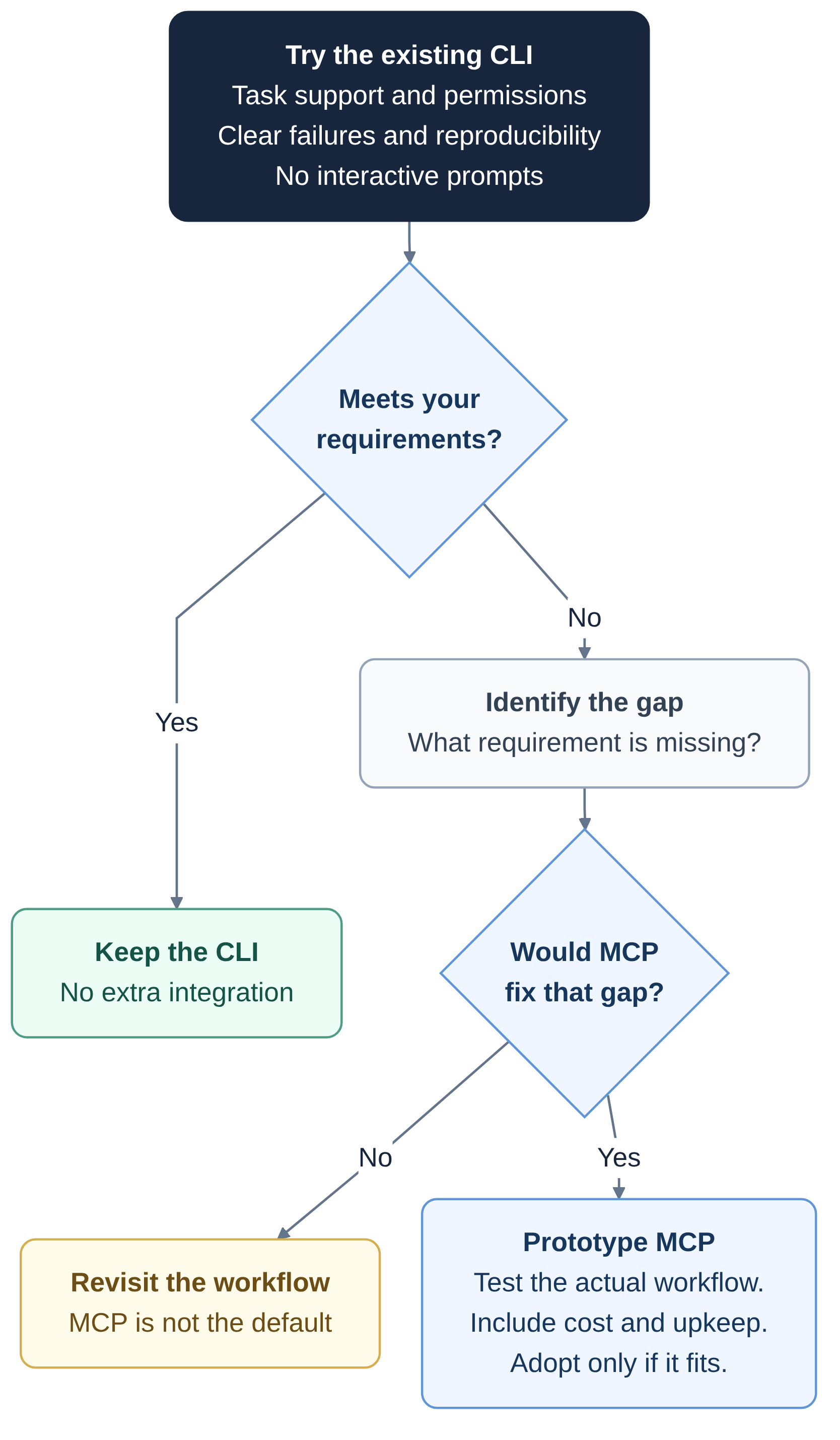
Start with the CLI. Observe where it fails. Build another integration when you can explain what it fixes.
If the existing tool already meets your requirements, I think leaving it alone is a perfectly reasonable engineering decision.